Sales Tax Calculator
Enter the price and your state and local rates to get the sales tax and the total, or work backwards from a total.
The Sales Tax Calculator adds US sales tax to a price, takes sales tax out of a total, or finds the combined tax rate from a receipt. You enter the price and the state, county, city and special district rates, and it shows the tax, the total and the combined rate.
The calculator runs in your browser. It is free and needs no sign-up, and nothing you type is uploaded. The result updates as you type, so you can change a price or rate and see the new figures straight away.
Because the tool has no built-in rates, you type in the rates that apply to your location. Sales tax rates change and differ by address, so use the current figures from your state’s revenue department.
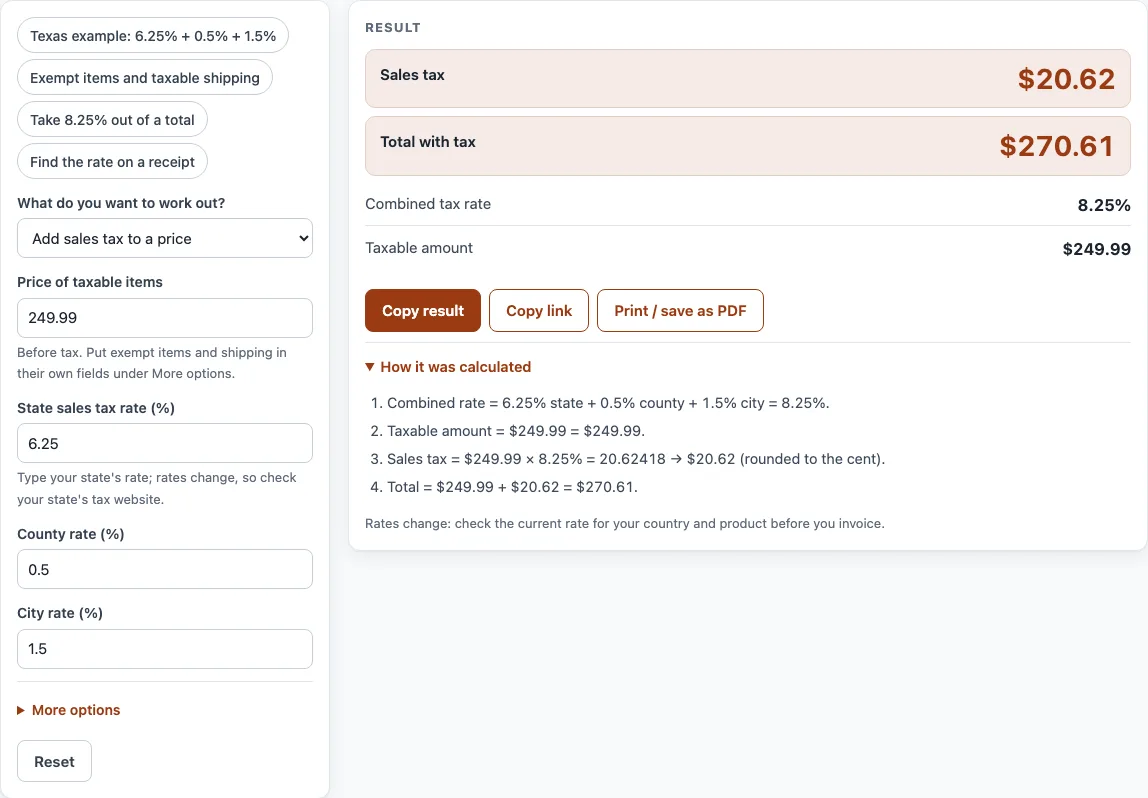
How to use the Sales Tax Calculator
- Under What do you want to work out?, choose one of three options: Add sales tax to a price, Take sales tax out of a total, or Find the tax rate from a receipt.
- Enter your amounts in the price fields. Use Price of taxable items (before tax) when you are adding tax, Total paid, tax included when you are taking tax out, and Price before tax when you have that figure.
- Enter the rates in State sales tax rate (%), County rate (%) and City rate (%); a Special district rate (%) is under More options. Leave any rate that does not apply to your address empty. The combined rate is the sum of these.
- Open More options to add Non-taxable items, a Shipping / delivery charge, and the Shipping is taxable in my state switch. Choose your currency from the Currency list.
- Read the result lines: Sales tax, Total with tax, Price before tax, Combined tax rate and Taxable amount. Open How it was calculated to see the formula with your own numbers.
The four example buttons at the top fill the form with a realistic case, such as the Texas example or taking 8.25% out of a total. Reset restores the starting example. Under the result, Copy result copies the figures, and Copy link copies a page address that keeps all your inputs. Print / save as PDF prints the inputs, result, calculation steps and date.
How is sales tax calculated in the United States?
Sales tax in the US is set by each state, and often by counties, cities and special districts as well. The rate you pay is the combined rate of all of them at the place of sale or delivery. There is no federal sales tax.
The calculation is simple once you have the combined rate. Tax equals the taxable price multiplied by the combined rate, and the total equals the price plus the tax. For example, a Texas item at a combined rate of 8.25% costs $249.99 plus $20.62 tax, a total of $270.61.
Why is sales tax added on top of the price?
Sales tax is added at the till, so the price on the shelf is usually the amount before tax. This is different from VAT in most other countries, where the price shown to consumers usually already includes the tax. If you are working with VAT, you need a different calculation.
How do you take sales tax out of a total?
If a total already includes sales tax, divide it by 1 plus the rate, written as a decimal. The formula is price before tax = total ÷ (1 + rate). For example, $108.25 at 8.25% gives $100.00 before tax, with $8.25 of tax inside the total.
How do you find the sales tax rate from a receipt?
Subtract the price from the total, then divide by the price. The formula is rate = (total − price) ÷ price. Because the tax on a receipt is rounded to the cent, the answer can differ from the official rate in the last decimal place. For example, $59.99 rising to $64.94 gives 8.2514%.
How does the calculator round sales tax?
The calculator rounds the tax to the cent, with halves rounded away from zero. For example, $10.10 at 5% gives tax of $0.505, which rounds to $0.51.
Which items and shipping charges are taxed?
Some items are exempt in some states, and the rules differ from state to state. Shipping and delivery charges may or may not be taxable depending on the state. Enter exempt items under Non-taxable items, which add to the total but not to the tax. Use the shipping switch to say whether shipping is taxable where you are.
Sources
- Example rate: Texas Comptroller, Sales and Use Tax — 6.25 % state rate plus local taxes of up to 2 %, 8.25 % at most (checked 11 October 2026). The calculator has no built-in rates.
- Every formula is worked through by hand in the tool’s tests (at least five reference cases).
Worked examples
| Input | Result |
|---|---|
| $249.99 at 8.25% | Tax $20.62, total $270.61 |
| $120.00 at 7% | Tax $9.10, total $174.55 |
| Total $108.25 including 8.25% tax | Before tax $100.00, tax $8.25 |
| Price $59.99, paid $64.94 | Tax rate 8.2514% |
Calculated by the tool above with these values.
Frequently asked questions
Is there a federal sales tax in the US?
No. Sales tax in the US is set by states, and often by counties, cities and special districts. Your combined rate is the total of all the rates that apply where the sale takes place.
Where do I find my current sales tax rate?
Check your state’s revenue department or tax website, which lists the current state, county, city and special district rates. The calculator does not store rates, so type the figures you find into the rate fields.
Does the calculator update rates for me?
No. The calculator has no built-in rates, and it never assumes today’s tax rate. You enter the rates yourself, so check them before you use the result.
Can I use the results in business documents?
Yes. Results may be used in commercial work, such as price lists, quotes and business plans, with no attribution required.
Why does the tool show a warning about a high rate?
The tool warns when the combined rate is unusually high for US sales tax. This usually means a rate has been typed in the wrong field or as the wrong figure, so check each rate against your tax authority’s figures.
Why is my sales tax negative?
A negative tax means the total is less than the price, which usually means a number has been entered incorrectly. Check the price and total fields. The combined rate of 0% also shows a warning, meaning no tax is added.
Is anything I type sent to a server?
No. The calculator runs entirely in your browser, and nothing you type is uploaded.
Related tools
- VAT calculator — add or remove VAT, one line or several rates.
- Discount calculator — percent off, sale price and stacked trade discounts.
- Markup calculator — the price from cost and markup, or the markup between cost and price.
- Profit margin calculator — profit, margin and markup from cost and price, or the price for a target margin.
- Cost per unit calculator — unit price, price per kg or litre, and the cheapest offer.
- Price increase calculator — percent increase and the new price that keeps your margin.