Sales Commission Calculator
Enter sales and the commission rate or tiers to get the commission and total pay.
A commission calculator works out how much a salesperson, agent or distributor earns from a set of sales. This sales commission calculator takes your sales figure, your commission plan and, if needed, your cost of sales, then shows the commission and the effective rate. It runs in your browser, is free, and needs no sign-up. The result updates as you type, so you can compare rates before a deal closes or a pay period ends.
You can use it as a commission pay calculator for a monthly target, a quick commission estimator for a quote, or a real estate agent commission calculator when the fee is a percentage of a sale. Choose a flat rate, a tiered plan, or a whole-amount plan. Add an optional base salary to see total pay in one line.
How to use the Sales Commission Calculator
- Choose a Commission plan: Flat rate on everything, Tiered – each rate on its own band, or Whole amount at the tier reached.
- Choose what Commission is paid on: Sales, or Gross profit (sales − cost).
- Enter Sales for the period, in the currency you selected.
- If you chose gross profit, enter Cost of sales. The tool subtracts it from sales.
- For a flat plan, enter a Commission rate (%).
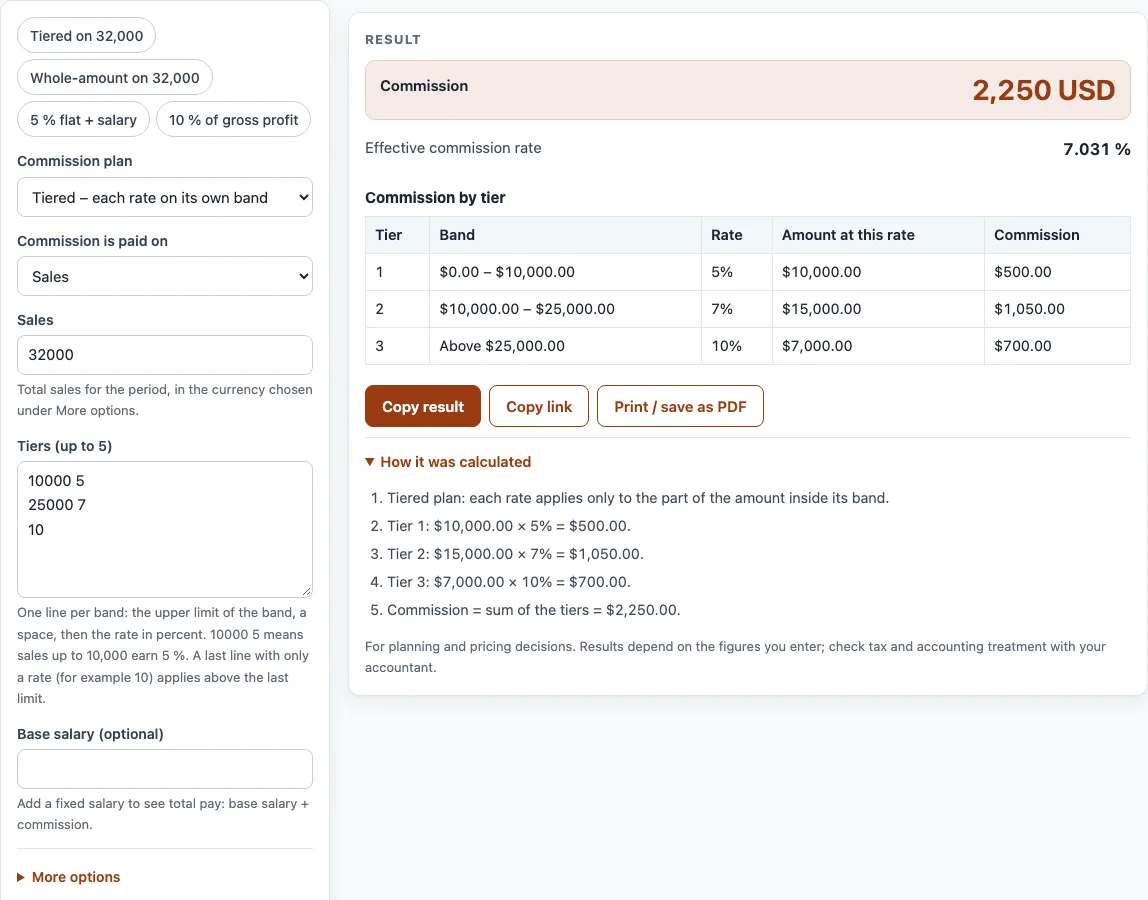
- For a tiered plan, enter Tiers (up to 5), one band per line. Write the upper limit, a space, then the rate, such as
10000 5. Finish with a line that holds only a rate, such as10, to cover amounts above the last limit. - Optionally, enter a Base salary (optional) to see total pay.
- Read the result lines: Commissionable gross profit, Commission, Effective commission rate and Total pay. The How it was calculated list shows each step with your numbers.
Use the example buttons at the top of the form to load a realistic case. The Reset button restores the starting example. The Currency setting sits under More options, along with other less-used fields. Under the result, Copy result copies the figures, Copy link keeps all your inputs in the page address, and Print / save as PDF prints the inputs, result, steps and date.
How is sales commission calculated?
Sales commission is a percentage of an amount you are allowed to earn it on. That amount is either total sales or gross profit. Gross profit is sales minus cost of sales, so commission on gross profit rewards selling at good prices rather than discounting heavily.
With a flat plan, the commission is sales multiplied by the rate. For example, 40,000 at 5% gives 2,000. The effective rate is the commission divided by the sales, which is useful when you compare plans.
Which commission plan should you choose: flat, tiered or whole amount?
A flat plan pays one rate on all sales. It is the simplest to explain and check.
A tiered plan applies each rate only to the part of sales inside its band, in the same way income tax brackets work. Using the bands 0–10,000 at 5%, 10,000–25,000 at 7% and above 25,000 at 10%, sales of 32,000 earn 500 + 1,050 + 700 = 2,250.
A whole-amount plan, sometimes called retroactive, pays every sale at the highest tier reached. The same 32,000 at 10% pays 3,200. This favours the seller once a higher tier is reached, so the plan terms matter when you compare results.
Total pay is base salary plus commission, plus any bonuses, which the tool does not add. Export agency agreements are different again. They often pay on invoice value, and the agreement sets the rate and when it is earned, such as on order, shipment or payment.
When is commission earned?
The plan or agency agreement decides. Common points are when the order is signed, when the goods ship or are invoiced, and when the customer pays. Paying on customer payment protects the business from commission on bad debts; paying on order rewards the salesperson sooner. Write the rule down, together with what happens on returns and cancelled orders.
Sources
- Flat, tiered (marginal) and gross-profit commission are arithmetic on the plan you type; the plan or agency agreement decides the actual rules.
- Every formula is worked through by hand in the tool’s tests (at least five reference cases per calculator).
Worked examples
| Input | Result |
|---|---|
| Tiered – each rate on its own band, Sales $32,000.00 | commission $2,250.00, total pay $2,250.00 |
| Whole amount at the tier reached, Sales $32,000.00 | commission $3,200.00, total pay $3,200.00 |
| Flat rate on everything, Sales $20,000.00 | commission $1,000.00, total pay $4,000.00 |
| Flat rate on everything, Gross profit (sales − cost) $50,000.00 | commission $2,000.00, total pay $2,000.00 |
| Tiered – each rate on its own band, Sales £8,000.00 | commission £400.00, total pay £2,900.00 |
Calculated by the tool above with these values.
Frequently asked questions
Is this commission calculator free to use?
Yes. It is free and needs no sign-up. You can change inputs as often as you like.
Is my sales data uploaded anywhere?
No. Everything runs in your browser, and nothing you type is uploaded.
Why does my commission show zero?
The tool shows a warning when the cause is clear. Cost may be higher than sales, gross profit may be zero, or sales may be zero. Check the Sales and Cost of sales fields first.
Why is part of my sales missing from the tiered commission?
If your last tier has an upper limit, amounts above it earn nothing. Add a final line with only a rate, such as 10, to cover amounts above the last limit.
Can I use the results in a quote or price list?
Yes. Results may be used in commercial work such as price lists, quotes and business plans, with no attribution needed.
Does the tool set the current tax or interest rate?
No. The calculators never assume today’s rates. You type in every rate yourself, so check your plan or agreement for the correct figure.
Can I compare two commission plans?
Yes. Enter the same sales figure, note the commission, then change the plan type or rates and compare. The effective rate (commission ÷ sales) shows which plan pays more at that sales level.
Related tools
- Profit margin calculator — profit, margin and markup from cost and price, or the price for a target margin.
- Gross margin calculator — gross profit and gross margin from revenue and COGS.
- Markup calculator — the price from cost and markup, or the markup between cost and price.
- Discount calculator — percent off, sale price and stacked trade discounts.
- ROI calculator — return on investment and annualized ROI.
- VAT calculator — add or remove VAT, one line or several rates.