Price Increase Calculator (Cost Increase Calculator)
Enter the old and new price, or a cost increase, to get the percentage and the new price that keeps your margin.
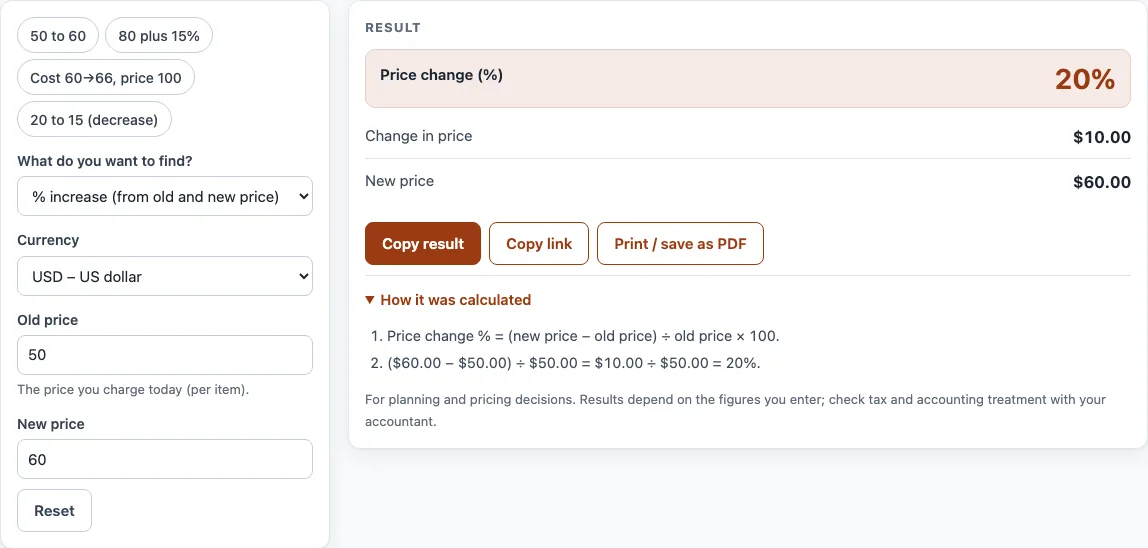
How to use the Price Increase Calculator
- Open the field labelled What do you want to find? and choose one of the three options: % increase (from old and new price), New price (from old price and %), or New price that keeps my margin (cost went up).
- Open Currency and pick your currency from the list, such as USD, EUR or GBP.
- Fill in the fields for your choice. For a % increase, enter Old price and New price. For a new price, enter Old price and Increase (%). For a margin check, enter Old price, Old cost and New cost.
- Read the result lines, such as Price change (%), New price and Margin if you leave the price alone.
- Open How it was calculated to see the formula and each step with your own numbers.
If you want a starting point, use the example buttons at the top of the form: ‘50 to 60’, ‘80 plus 15%’, ‘Cost 60→66, price 100’ or ‘20 to 15 (decrease)’. Use Reset to return to the starting example. Some fields are under More options. Below the result, Copy result copies the figures, Copy link saves a link that restores all your inputs, and Print / save as PDF prints the inputs, result, steps and date.
Use Copy link to send the result to a colleague, or Print / save as PDF to keep the figures with the date when you announce a price change.
How do you calculate a cost increase percentage?
To find a percentage increase, subtract the old price from the new price, divide by the old price, and multiply by 100: (new price − old price) ÷ old price × 100. For example, a rise from 40 to 46 is a 15% increase, because 6 ÷ 40 = 0.15.
To go the other way, multiply the old price by (1 + increase). An 80 price with a 12% increase becomes 80 × 1.12 = 89.60.
A decrease shows as a negative percentage. Percentage changes do not cancel out when they are applied one after another. A 20% decrease followed by a 20% increase does not return to the original price: 100 becomes 80, then 96.
How do you keep your margin when your costs rise?
Your margin is the share of your price that is profit after the cost of the item. To keep the same margin percentage when your cost goes up, use new price = new cost ÷ (1 − old margin). Take a cost of 60 that rises to 66, with a price of 100 and a 40% margin. The new price is 66 ÷ 0.6 = 110.
You can also keep the same profit amount in money instead. Add the cost increase to your old price: new price = old price + (new cost − old cost). In the same example, that gives 100 + 6 = 106. Your margin then falls to 37.74%, because your profit is still 40 but the price is higher.
Passing on only the cost increase in money, rather than in percentage terms, lowers your margin percentage. Check which of these two you need before you set a new price.
How do you announce a price increase to customers?
Give notice in writing before the new price takes effect, state the new price and the date, and say briefly why (for example higher material or freight costs). For contracts or open quotations, check the price-review clause first: some fix prices until a date or need a set notice period.
Sources
- Price needed to keep a margin when costs rise: price = cost ÷ (1 − margin), from the margin definition in OpenStax Principles of Accounting, Volume 1: Financial Accounting (free textbook).
- Every formula is worked through by hand in the tool’s tests (at least five reference cases per calculator).
Worked examples
| Input | Result |
|---|---|
| From $50.00 to $60.00 | 20% change |
| $80.00 plus 15% | New price $92.00 |
| Price $100.00, cost $60.00 to $66.00 | New price $110.00 (10%) |
| From €20.00 to €15.00 | −25% change |
| Price £24.99, cost £14.00 to £16.50 | New price £29.45 (17.86%) |
Calculated by the tool above with these values.
Frequently asked questions
Can I use the calculator for a price decrease?
Yes. Enter a negative number in the Increase (%) field, such as -10 for a 10% decrease. The New price result will be lower than the old price. You can also use the ‘20 to 15 (decrease)’ example to see how it works.
What happens if my cost goes down?
The calculator shows the change as a negative percentage. If your cost falls, the price that keeps your margin will be lower than today’s price, and the tool shows a warning to say so.
Is what I type sent anywhere?
No. Everything runs in your browser, and nothing you type is uploaded.
Can I save or share my result?
Yes. Copy link creates an address that holds all your inputs, so opening it brings back the same result. Print / save as PDF creates a record with your inputs, result, calculation steps and the date.
Can I use the results in a quote or price list?
Yes. You can use results in commercial work, such as price lists, quotes and business plans, without any attribution.
Does the calculator include tax or interest?
No. The calculator does not assume a tax or interest rate. If you need one in your figures, type the rate in yourself.
Related tools
- Discount calculator — percent off, sale price and stacked trade discounts.
- Markup calculator — the price from cost and markup, or the markup between cost and price.
- Profit margin calculator — profit, margin and markup from cost and price, or the price for a target margin.
- Cost per unit calculator — unit price, price per kg or litre, and the cheapest offer.
- Markup v margin chart — convert markup and margin and print a conversion table.
- COGS calculator — cost of goods sold, gross margin and inventory turnover.