Operating Margin Calculator: Calculate Operating Profit
Enter revenue, cost of goods sold and operating expenses to get operating profit, operating margin and EBITDA.
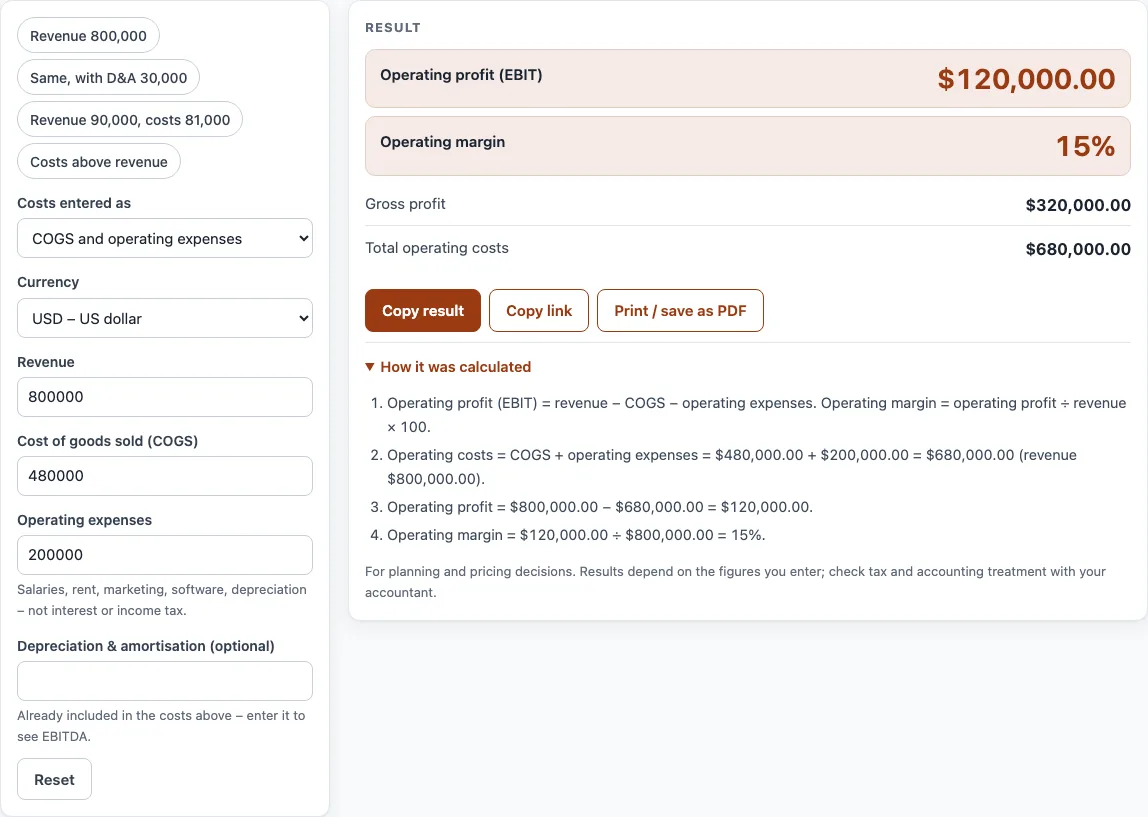
How to use the Operating Margin Calculator
- Pick a currency from the Currency list. Options include USD, EUR, GBP and 20 others.
- Under Costs entered as, choose COGS and operating expenses if you have those two figures separately. Choose One total of operating costs if you have a single figure.
- Type your total sales in the Revenue field.
- If you chose COGS and operating expenses, fill in Cost of goods sold (COGS) and Operating expenses. If you chose one total, fill in Total operating costs instead.
- Optional: enter Depreciation & amortisation (optional) to see EBITDA and EBITDA margin. Its help text says it is already included in your costs, so do not add it to them a second time.
- Read Operating profit (EBIT) and Operating margin in the result. Check the How it was calculated list to see each step with your own numbers.
If a warning appears, read it before you use the result. The example buttons at the top of the form fill in a realistic case so you can see how the fields work. Reset restores the starting example, and some fields sit under More options. Under the result, Copy result copies the figures, Copy link keeps all your inputs in the page address, and Print / save as PDF prints your inputs, result, calculation steps and the date.
How do you calculate operating profit?
Operating profit equals revenue minus cost of goods sold (COGS) minus operating expenses. It is also called operating income or EBIT, which stands for earnings before interest and taxes. Operating expenses include selling, general and administrative costs, research, and depreciation and amortisation.
Gross profit comes first: revenue minus COGS. Subtracting operating expenses from gross profit gives operating profit. In the standard example, revenue is 800,000, COGS is 480,000 and operating expenses are 200,000. So 800,000 − 480,000 − 200,000 = 120,000.
Strictly, EBIT can include non-operating income. This calculator uses operating profit from the figures you enter.
How do you calculate operating profit margin?
Operating margin equals operating profit divided by revenue, multiplied by 100. It shows how much of each unit of sales becomes operating profit before financing and taxes. In the example, 120,000 ÷ 800,000 × 100 = 15%.
EBITDA is operating profit plus depreciation and amortisation. EBITDA margin is EBITDA divided by revenue, multiplied by 100. With depreciation and amortisation of 40,000, EBITDA is 160,000 and the EBITDA margin is 20%.
If your costs are higher than revenue, operating profit is negative, which the calculator reports as an operating loss.
Why does operating margin matter?
Operating margin shows how efficiently the core business turns sales into profit before financing and taxes. Because it stops before interest and tax, it lets you compare two businesses, or two years of the same business, even when their debt or tax position differs. A rising operating margin with flat sales usually means costs are under control; a falling one means costs are growing faster than revenue.
What is the difference between operating margin and EBITDA margin?
EBITDA margin adds depreciation and amortisation back to operating profit. It is higher than the operating margin for any business that owns equipment, buildings or software it depreciates. Lenders often look at EBITDA; operating margin is closer to the profit the business actually keeps.
Sources
- Operating income and operating margin: OpenStax Principles of Accounting, Volume 1: Financial Accounting (free textbook).
- Every formula is worked through by hand in the tool’s tests (at least five reference cases per calculator).
Worked examples
| Input | Result |
|---|---|
| Revenue $800,000.00, COGS $480,000.00, operating expenses $200,000.00 | Operating profit $120,000.00, operating margin 15% |
| Revenue $800,000.00, COGS $480,000.00, operating expenses $200,000.00 | Operating profit $120,000.00, operating margin 15%, EBITDA $150,000.00 |
| Revenue $90,000.00, operating costs $81,000.00 | Operating profit $9,000.00, operating margin 10% |
| Revenue $50,000.00, operating costs $55,000.00 | Operating profit −$5,000.00, operating margin −10% |
Calculated by the tool above with these values.
Frequently asked questions
What is the difference between operating profit and net profit?
Operating profit is what remains after COGS and operating expenses, before interest and income tax. Net profit is what remains after interest and tax are also deducted.
Is operating profit the same as EBIT?
In this calculator, yes. Strictly, EBIT can include non-operating income, so this tool uses the operating profit from the figures you enter.
Should depreciation be included in operating expenses?
Yes. Depreciation and amortisation are already part of your costs. Enter them separately only if you want to see EBITDA, and do not add them to your costs twice.
What does a negative operating profit mean?
It means your costs are higher than your revenue, which the calculator shows as an operating loss. If COGS alone is higher than revenue, gross profit is also negative.
Why does the calculator say my operating margin is unusually high?
A very high margin often means some operating costs are missing. Check that salaries, rent, marketing, software and other operating expenses are all included.
Does the calculator include interest or income tax?
No. Interest and income tax are excluded from operating profit. Use the net margin calculator to go down to net profit.
Related tools
- Net margin calculator — net profit and net profit margin after all costs.
- Gross margin calculator — gross profit and gross margin from revenue and COGS.
- Profit margin calculator — profit, margin and markup from cost and price, or the price for a target margin.
- Contribution margin calculator — contribution per unit, in total and as a ratio.
- Break even calculator — break-even units and sales with a chart.
- ROI calculator — return on investment and annualized ROI.