Markup Calculator
Enter cost and markup to get the price, or cost and price to get the markup and margin.
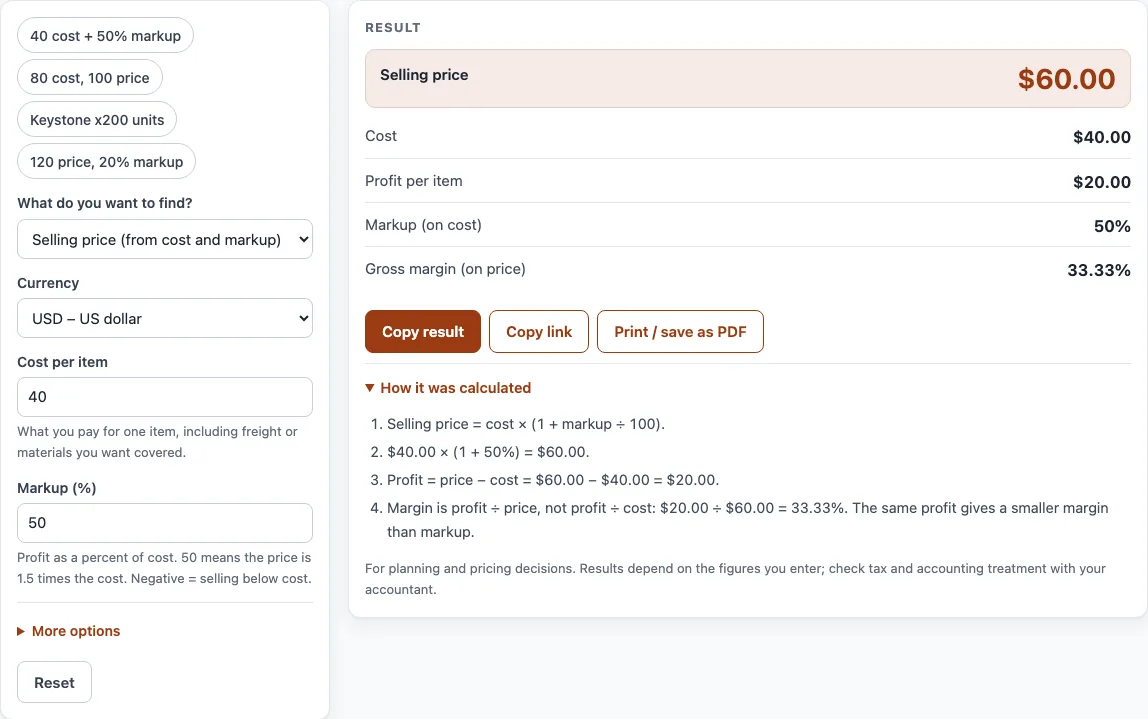
How to use the Markup Calculator
- Under What do you want to find?, choose Selling price (from cost and markup), Markup % (from cost and price), or Cost (from price and markup).
- Pick your currency from the Currency list.
- Type your Cost per item. This is what you pay for one item, including any freight or materials you want covered.
- Fill in the other input your choice needs: Selling price per item or Markup (%). A markup of 50 means the price is 1.5 times the cost.
- If you want totals, enter a figure in Number of items (optional).
- Read the result lines: Selling price, Cost, Profit per item, Markup (on cost), and Gross margin (on price). With a quantity, you also see Total cost, Total revenue, and Total profit.
- Check any warning that appears before you use the number.
The example buttons at the top fill in a realistic case, and the Reset button restores the starting example. Some fields are under “More options”, so open that section if a field you need is missing. Under the result, Copy result copies the figures, and Copy link keeps all your inputs in the page address, so opening the link restores the same result. Print / save as PDF prints your inputs, the result, the calculation steps, and the date. Open “How it was calculated” to see the formula with your own numbers.
What is the markup formula?
Markup is the profit as a percentage of cost. The formula is Markup % = (selling price − cost) ÷ cost × 100. If you know the cost and the markup, the price is cost × (1 + markup). For example, a cost of 40 with a 50% markup gives a price of 60, a profit of 20, and a markup of 50%. Because the markup is measured against cost, every calculation starts from what you paid.
How do you find markup percentage?
Subtract the cost from the selling price, divide by the cost, and multiply by 100. A price of 120 on a cost of 100 gives (120 − 100) ÷ 100 × 100, which is a 20% markup. This is the figuring markup percentage step most people need when they compare prices from different suppliers. Choose “Markup %” in the calculator to do it automatically.
How do you determine a cost from a price and markup?
Divide the price by one plus the markup, written as a decimal. Cost = price ÷ (1 + markup). A price of 120 with a 20% markup gives a cost of 120 ÷ 1.2 = 100. Many people make the mistake of taking 20% off the price instead, which gives 96 and is wrong. Working backwards this way is the mark up calculation you need when you know what you will charge and want to know what you can afford to pay.
What is the difference between markup and margin?
Markup is measured on cost, while margin is measured on the selling price. The two percentages describe the same profit, but they produce different numbers. Markup = margin ÷ (1 − margin), and margin = markup ÷ (1 + markup). A 25% margin is a 33.33% markup on the same sale.
Why is a 100% markup a 50% margin?
A 100% markup doubles the cost. If an item costs 50 and sells for 100, the profit is 50, which is 100% of cost but 50% of price. This is called keystone pricing in retail. It is a common starting point because it is easy to apply, but it is only one option.
Do sales tax and tips change the markup calculator result?
No. The calculator works only with the cost, the price, the markup, and the quantity. It does not add sales tax or tips, and it never assumes a current tax rate. If you need tax in a quote, work out the tax with the rate that applies to you, and add it after you have the selling price.
What does a negative markup mean?
A negative markup means you are selling below cost. The calculator shows a warning when this happens, because you lose money on every item. Markup must be above −100%, since a price cannot go below zero. A markup of 0% means the price equals the cost, so there is no profit.
How does markup work in export pricing?
Apply the markup to the full cost up to the agreed Incoterms point. If you leave out freight and fees that come before that point, they can use up your profit. Check which costs your markup covers before you set a price for an overseas buyer.
Sources
- Markup on cost and margin on price: OpenStax Principles of Accounting, Volume 1: Financial Accounting (free textbook).
- Every formula is worked through by hand in the tool’s tests (at least five reference cases per calculator).
Worked examples
| Input | Result |
|---|---|
| Cost $40.00, markup 50% | Price $60.00 (margin 33.33%) |
| Cost $80.00, price $100.00 | Markup 25% (margin 20%) |
| Price $120.00, markup 20% | Cost $100.00 (margin 16.67%) |
| Cost €12.50, markup 100% | Price €25.00 (margin 50%) |
| Cost $10.00, markup 300% | Price $40.00 (margin 75%) |
Calculated by the tool above with these values.
Frequently asked questions
What is a markup calculator?
A markup calculator finds the selling price, the markup percentage, or the cost of an item when you know the other two numbers. This one does it in your browser for free.
How do I calculate markup percentage?
Subtract the cost from the selling price, divide the result by the cost, and multiply by 100. A cost of 40 and a price of 60 give a 50% markup.
Is markup the same as margin?
No. Markup is measured on cost, while margin is measured on the selling price, so the same profit gives a larger markup percentage than margin percentage.
What is keystone pricing?
Keystone pricing is a 100% markup, which doubles the cost. It is equal to a 50% gross margin.
Can I use the results in price lists or quotes?
Yes. Results may be used in commercial work such as price lists, quotes, and business plans, with no attribution needed.
Are my numbers saved or sent anywhere?
Everything runs in your browser, and nothing you type is uploaded. The Copy link button keeps your inputs in the page address only.
Why does the calculator show a warning?
It warns you when the markup is 0%, because there is no profit, or when the markup is negative, because you sell below cost. It also shows an error if the markup is at or below −100%.
Related tools
- Markup v margin chart — convert markup and margin and print a conversion table.
- Profit margin calculator — profit, margin and markup from cost and price, or the price for a target margin.
- Discount calculator — percent off, sale price and stacked trade discounts.
- Price increase calculator — percent increase and the new price that keeps your margin.
- Cost per unit calculator — unit price, price per kg or litre, and the cheapest offer.
- VAT calculator — add or remove VAT, one line or several rates.