Markup v Margin Chart and Converter
Convert a markup to a margin or back, or print a conversion table for your price list.
Markup v margin: they are two ways of expressing the same profit. Markup is profit divided by cost, and margin is profit divided by selling price, so the two numbers are always different for the same sale. This free Margin Markup Chart converts either one into the other and builds a table you can scan. It runs in your browser, needs no sign-up, and does not upload anything you type.
Markup can be any size, but margin can never reach 100%, because some of the price has to cover the cost. The chart helps you see both values side by side, so you can quote prices or check a target without doing the division by hand.
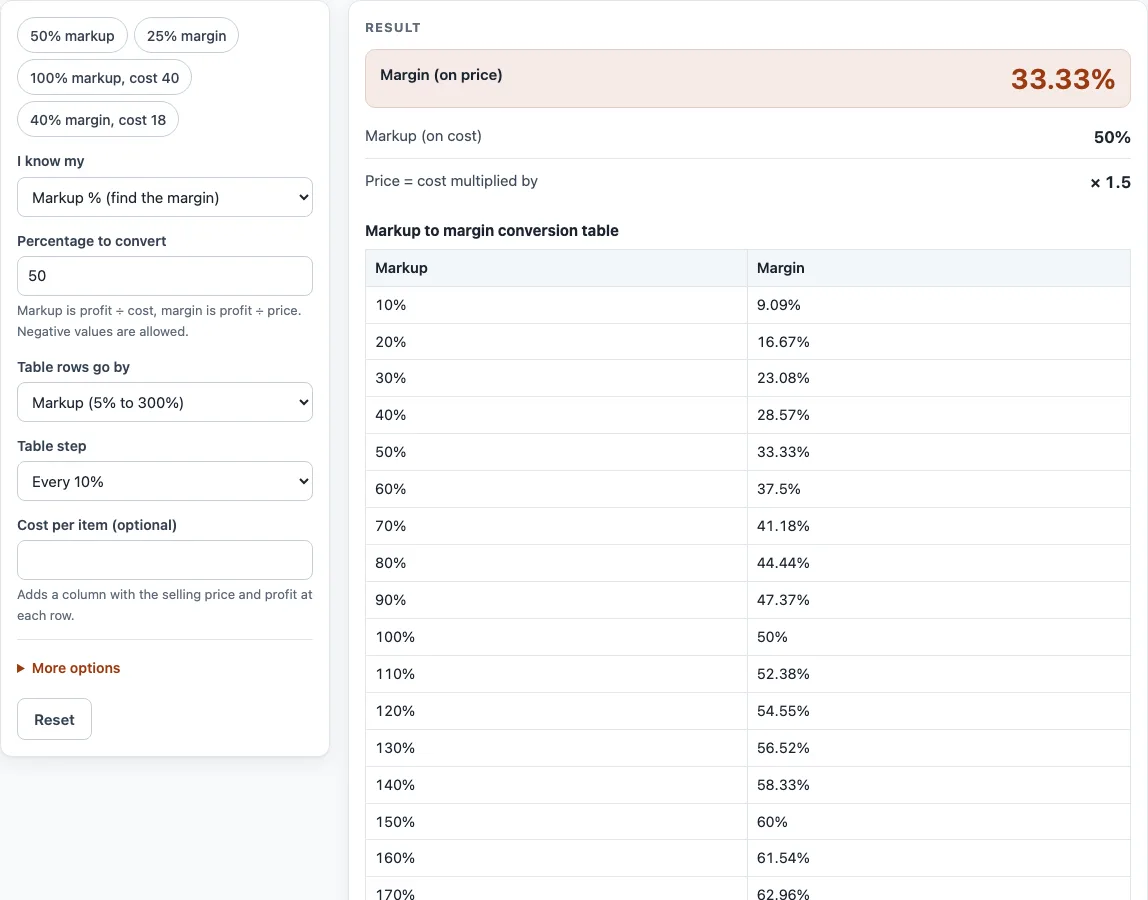
How to use the Margin Markup Chart
- Under I know my, choose Markup % (to find the margin) or Margin % (to find the markup).
- Type your figure in Percentage to convert. The result updates as you type.
- Read the result lines: Markup (on cost) and Margin (on price), plus Price = cost multiplied by.
- For a full table, set Table rows go by to Markup (5% to 300%) or Margin (5% to 80%).
- Set Table step to every 5% or every 10%.
- If you want money figures, enter a Cost per item (optional). This adds a column with the selling price and profit at each row.
- Choose your Currency from the list.
Use the example buttons at the top of the form to load a realistic case, such as 50% markup or 40% margin, cost 18. The Reset button restores the starting example. Some fields sit under More options.
Below the result, Copy result copies the figures, and Copy link gives you a page address that keeps all your inputs, so opening it shows the same result. Print / save as PDF prints your inputs, the result, the calculation steps and the date.
The table is ready to print: click Print / save as PDF and the full table prints with your inputs and the date, so you can pin it next to the price list.
What is the difference between markup and margin?
Markup and margin both measure the same profit, but they divide it by different amounts. Markup divides profit by cost. Margin divides profit by selling price.
Suppose an item costs 100 and sells for 150. The profit is 50. Markup is 50 ÷ 100 = 50%. Margin is 50 ÷ 150 = 33.33%. The same sale gives two different percentages because the base is different.
Because margin uses the selling price as its base, it is always smaller than markup for a profitable sale. Margin shows how much of each sale you keep; markup shows how much you add to the cost.
How do you convert markup to margin and back?
Use these formulas with decimals (50% becomes 0.50):
- Margin = markup ÷ (1 + markup)
- Markup = margin ÷ (1 − margin)
For example, a 25% markup gives a margin of 0.25 ÷ 1.25 = 0.20, or 20%. A 40% margin gives a markup of 0.40 ÷ 0.60 = 0.6667, or 66.67%.
Some common pairs are:
- 10% markup = 9.09% margin
- 25% markup = 20% margin
- 50% markup = 33.33% margin
- 100% markup = 50% margin
- 200% markup = 66.67% margin
Margin has a ceiling. Because the formula divides by (1 − margin), a margin of 100% would need an infinite markup, so margin must stay below 100%. Markup has no upper limit.
To turn a cost and a target margin into a selling price, use price = cost ÷ (1 − margin). For a 40% margin on a cost of 30, the price is 30 ÷ 0.6 = 50. A conversion chart like this lets a sales team read that price quickly from a cost and a target margin.
Negative values are allowed. A negative percentage means you are selling below cost, and the tool shows a warning when this happens.
When should I use a mark up to margin calculator instead of the chart?
Use the converter at the top when you have one exact figure, such as a 37.5% markup, and the chart when you want to see many values at once or print them. The mark up to margin calculator gives the same result as the table rows, worked out to two decimals, so a quote and the printed chart always agree.
Sources
- Conversions: margin = markup ÷ (1 + markup); markup = margin ÷ (1 − margin) — algebra from the two definitions, each row computed by the tool.
- Every formula is worked through by hand in the tool’s tests (at least five reference cases per calculator).
Worked examples
| Input | Result |
|---|---|
| Markup 50% | Margin 33.33% |
| Margin 25% | Markup 33.33% |
| Markup 100% | Margin 50% |
| Margin 40% | Markup 66.67% |
Calculated by the tool above with these values.
Frequently asked questions
Is markup the same as margin?
No. Both describe the same profit, but markup divides it by cost and margin divides it by selling price. Because the bases differ, the percentages differ too.
Why can’t margin be 100%?
A margin of 100% would mean the whole selling price is profit and nothing is left for the cost. The markup formula divides by (1 − margin), so the calculation breaks down at that point. The tool shows an error if you try it.
What does a negative percentage mean?
A negative value means you are selling below cost, so the profit is a loss. The tool allows negative values but shows a warning to make the situation clear.
How do I get a selling price from a target margin?
Divide the cost by (1 − margin). For example, a cost of 30 with a 40% target margin gives 30 ÷ 0.6 = 50.
Can I use the results in a price list or quote?
Yes. Results may be used in commercial work, such as price lists, quotes and business plans, with no attribution required.
Does the tool save what I type?
Everything runs in your browser, and nothing you type is uploaded. The Copy link button keeps your inputs in the page address, so you can share or bookmark a specific result.
Related tools
- Markup calculator — the price from cost and markup, or the markup between cost and price.
- Profit margin calculator — profit, margin and markup from cost and price, or the price for a target margin.
- Gross margin calculator — gross profit and gross margin from revenue and COGS.
- Discount calculator — percent off, sale price and stacked trade discounts.
- Price increase calculator — percent increase and the new price that keeps your margin.
- Cost per unit calculator — unit price, price per kg or litre, and the cheapest offer.