Internal Rate of Return Calculator (IRR and NPV)
Enter the cash flows of a project to get its IRR, its NPV at your discount rate and the discounted cash flow table.
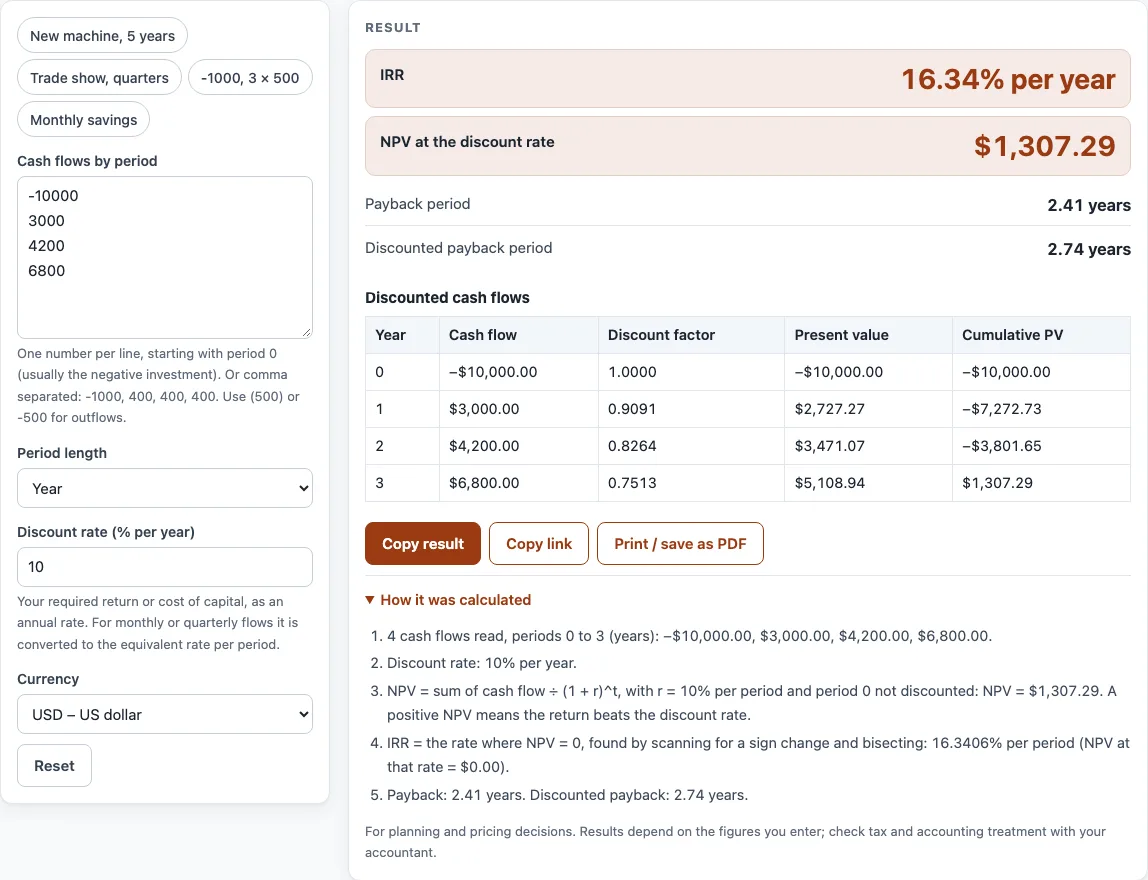
How to use the IRR Calculator
- In Cash flows by period, type one number per line, starting with period 0. Period 0 is usually the negative investment. You can also separate the numbers with commas, for example
-1000, 400, 400, 400. Write outflows as-500or(500). - Under Period length, choose Year, Month or Quarter to match the spacing of your numbers.
- In Discount rate (% per year), enter your required return or cost of capital as an annual rate. For monthly or quarterly flows, the tool converts it to the equivalent rate per period.
- Under Currency, pick the currency for the money amounts.
- Read the results: NPV at the discount rate, IRR, IRR annualized, Payback period and Discounted payback period.
- Check any warning shown below the result. Warnings flag problems such as cash flows that never change sign, or a first cash flow that is not negative.
If you want a starting point, click an example button at the top of the form: New machine, 5 years, Trade show, quarters, -1000, 3 × 500 or Monthly savings. The Reset button restores the starting example. Some fields are under More options.
Under the result, Copy result copies the figures, and Copy link copies a page address that keeps all your inputs, so opening it shows the same result. Print / save as PDF prints the inputs, the result, the calculation steps and the date. The How it was calculated list shows the formula with your own numbers.
What is the internal rate of return?
The internal rate of return (IRR) is the discount rate that makes the net present value of a set of cash flows exactly zero. A project with an IRR of 10% earns 10% a year on the money tied up in it, after accounting for the timing of every payment. For example, paying 100 now and receiving 110 one year later gives an IRR of 10%, because 110 ÷ 1.10 = 100.
IRR has no direct formula you can rearrange. The calculator finds it by trial: it tries a rate, checks whether the NPV is zero, adjusts the rate and repeats until the NPV is effectively zero.
How does the NPV formula find the IRR?
Net present value discounts each cash flow back to period 0 and adds them up. The formula is NPV = sum of each cash flow ÷ (1 + r)^t, where r is the discount rate per period and t is the period number. The first cash flow, at t = 0, is not discounted.
Here is an NPV formula example. Suppose you pay 1,000 now, then receive 500 at the end of each of the next three years, and your required rate is 10%:
−1,000 + 500 ÷ 1.10 + 500 ÷ 1.10² + 500 ÷ 1.10³ = −1,000 + 454.55 + 413.22 + 375.66 = 243.43
The NPV is positive, so at 10% the project is worth doing. The IRR is the rate that would make this total zero, which is higher than 10%. For a normal project, with one outflow followed by inflows, a positive NPV at your rate is the same as an IRR above that rate.
A real estate internal rate of return calculator uses the same logic. You enter the purchase price as a negative number in period 0, the net rent for each year, and the sale proceeds in the final period.
If cash flows change sign more than once, for example when a project needs a second outlay later, there can be several IRRs or none. In that case, the NPV at your required rate is the safer guide for a decision.
Sources
- Net present value and internal rate of return: OpenStax Principles of Accounting, Volume 2: Managerial Accounting (free textbook), capital budgeting.
- Every formula is worked through by hand in the tool’s tests (at least five reference cases per calculator).
Worked examples
| Input | Result |
|---|---|
| 1 cash flows after period 0: −100, 110; 8% | NPV $1.85, IRR 10% per year |
| 3 cash flows after period 0: −1,000, 500, 500, 500; 10% | NPV $243.43, IRR 23.38% per year |
| 3 cash flows after period 0: −1,000, 400, 400, 400; 8% | NPV $30.84, IRR 9.7% per year |
| 8 cash flows after period 0: −12,000, 1,600, 1,600, 1,600, 1,600, …; 10% | NPV €352.64, IRR 1.46% per month |
| 2 cash flows after period 0: −100, 230, −132; 10% | NPV $0.00, IRR 10% per year |
Calculated by the tool above with these values.
Frequently asked questions
What does the IRR calculator need from me?
You need a list of cash flows, with the investment in period 0 as a negative number, and your required annual discount rate. Choose the period length that matches your numbers.
Why is my IRR missing or showing a warning?
Warnings appear when the numbers cannot give a clear IRR. If all cash flows have the same sign, there is no IRR, because money must go out and come in. If the cash flows change sign more than once, several IRRs may exist, so the tool shows the one closest to zero and recommends using NPV.
What discount rate should I use?
Use your required return or cost of capital, typed as an annual rate. The calculator does not assume today’s interest or tax rate, so you set the figure yourself.
Can I use monthly or quarterly cash flows?
Yes. Choose Month or Quarter under Period length. The IRR is found per period. To convert a monthly IRR to an annual rate, use (1 + monthly IRR)^12 − 1. For quarterly IRR, use ^4 instead of ^12.
Does the order of my cash flows matter?
Yes. The first number must be period 0, normally the investment. If the first cash flow is positive, the tool warns you, so check the order of your list.
Can I use the results in a business plan or quote?
Yes. Results may be used in commercial work, such as price lists, quotes and business plans, with no attribution required.
Related tools
- ROI calculator — return on investment and annualized ROI.
- Payback period calculator — simple and discounted payback in years.
- Break even calculator — break-even units and sales with a chart.
- Net margin calculator — net profit and net profit margin after all costs.
- Profit margin calculator — profit, margin and markup from cost and price, or the price for a target margin.
- Late payment interest calculator — interest and compensation on an overdue invoice.