Discount Calculator (Percent Off)
Enter a price and a discount to get the sale price and saving, or two prices to get the percent off.
The Discount Calculator is a free online tool that works out a sale price, a percent off, or an original price from the numbers you already have. Type an original price and a discount, and it shows how much you save and what you pay. It also works in reverse, finding the discount from an original and a sale price, and it can handle stacked discounts such as 20% then 10% off.
Use it as a 15 discount calculator, a 10 percent off calculator, or a 50 percent off calculator by entering the rate you need. It works as a rate discount calculator too, since you type in any percentage yourself.
Everything runs in your browser. Nothing you type is uploaded, and there is no sign-up. Results can be used in price lists, quotes and business plans.
How to use the Discount Calculator
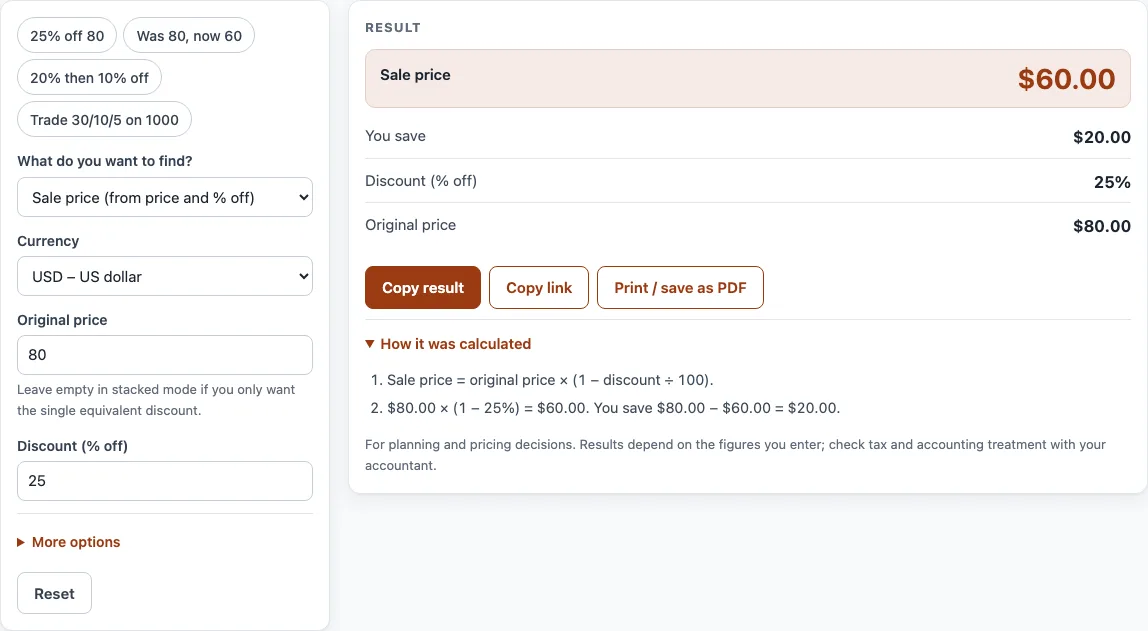
- Open the field labelled What do you want to find? and choose one option: Sale price (from price and % off), % off (from original and sale price), Original price (from sale price and % off), or Stacked or trade discounts (20% then 10%).
- Type the Original price in its field.
- Type the Sale price or the Discount (% off), depending on what you chose in step 1.
- For stacked or trade discounts, type the rates in Discounts, one after another, separated by slashes or commas, such as 30/10/5.
- Choose your Currency from the list.
- If you need tax, enter the Sales tax rate (%, optional). Check the current rate for your state or country, because the tool does not assume one.
- Read the result lines: Sale price, You save, Discount (% off), Original price, Sales tax on the sale price, and Total with tax. The result updates as you type.
The four example buttons at the top of the form fill in a realistic case, such as “25% off 80” or “Trade 30/10/5 on 1000”. The Reset button restores the starting example. Some fields sit under More options.
Under the result, Copy result copies the figures, and Copy link keeps all your inputs in the page address, so opening it restores the same result. Print / save as PDF prints the inputs, the result, the calculation steps and the date.
What is the discount percentage calculator?
A discount percentage calculator links three numbers: the original price, the discount, and the sale price. The sale price equals the original price multiplied by (1 − discount %). The amount you save equals the original price multiplied by the discount %. For example, 80 with 25% off gives a saving of 20 and a sale price of 60.
The same method works for any rate. At 15% off, an 80 item saves 12 and sells for 68. Trade discounts follow the same logic. A trade discount is a reduction from a list price given to resellers. A cash discount, such as 2/10 net 30, is different because it rewards paying early.
Discounts applied one after another do not add together. They multiply. A 20% discount followed by 10% off gives 1 − 0.8 × 0.9 = 28% in total, not 30%. A chain such as 30/10/5 means 30%, then 10% off the remaining price, then 5% off what is left. Its single equivalent discount is 1 − 0.7 × 0.9 × 0.95 = 40.15%.
How to calculate discount percentage calculator results?
To find the percent off between two prices, subtract the sale price from the original, divide by the original, and multiply by 100: (original − sale) ÷ original × 100. For example, a price that drops from 120 to 90 is 25% off.
To find the original price from a sale price and a discount, divide the sale price by (1 − discount). If an item costs 60 after 25% off, the original was 60 ÷ 0.75 = 80.
Multiplying by a decimal is often quicker for mental maths. To take 20% off, multiply the price by 0.8, so 50 becomes 50 × 0.8 = 40. Taking 10% off means multiplying by 0.9, and 50% off means halving the price.
Sales tax is normally calculated on the price after the discount. Take the sale price, multiply it by the tax rate, and add the result to get the total.
What is the percentage off calculator?
A percentage off calculator expresses a price drop as a share of the original price. “50% off” means the price is halved, and “10% off” means you pay 90% of the original. Because the percentage is always measured against the original price, the same rate gives a different cash saving on each item.
The calculator works in both directions. It can start from a price and a rate to find the sale price, or from two prices to find the rate. A reverse calculation is useful when a shop shows only the new price and you want to know how big the discount was.
Two results need care. A sale price higher than the original is a price increase, not a discount. A 100% discount makes the item free, and nothing can be worked back from it. Discounts must sit between 0% and 100%.
Sources
- Percentage arithmetic only; chained trade discounts multiply (1 − d₁)(1 − d₂)… The tool never assumes a sales tax rate.
- Every formula is worked through by hand in the tool’s tests (at least five reference cases per calculator).
Worked examples
| Input | Result |
|---|---|
| $80.00 with 25% off | Sale price $60.00, you save $20.00 |
| Was $80.00, now $60.00 | 25% off |
| Sale price $60.00 after 25% off | Original price $80.00 |
| Discounts 20, 10 | One equivalent discount of 28% |
| Discounts 30/10/5 | One equivalent discount of 40.15% |
Calculated by the tool above with these values.
Frequently asked questions
Does the Discount Calculator send my numbers anywhere?
No. Everything runs in your browser, and nothing you type is uploaded. There is also no sign-up.
Can I use the results in business documents?
Yes. Results may be used in commercial work such as price lists, quotes and business plans, with no attribution required.
Why is 20% then 10% off not the same as 30% off?
Successive discounts multiply rather than add. 20% then 10% off leaves 0.8 × 0.9 = 0.72 of the price, which is a 28% total discount.
Does the tool include sales tax automatically?
Only if you enter a rate. Type the Sales tax rate (%) and the tool adds the tax to the discounted price. Check the current rate for your state or country, because the tool never assumes one.
What does “The item is free at this discount” mean?
It means the discount is 100%, so the sale price is zero. The calculator can show this warning, but it cannot work back an original price from a 100% discount.
Why does the calculator say the sale price is higher than the original?
A sale price above the original is a price increase, not a discount. Check that you entered the original and sale prices in the correct fields.
Can I find the original price from a sale price?
Yes. Choose “Original price (from sale price and % off)” in the What do you want to find? field, then enter the sale price and the discount.
Related tools
- Price increase calculator — percent increase and the new price that keeps your margin.
- Markup calculator — the price from cost and markup, or the markup between cost and price.
- Profit margin calculator — profit, margin and markup from cost and price, or the price for a target margin.
- VAT calculator — add or remove VAT, one line or several rates.
- Markup v margin chart — convert markup and margin and print a conversion table.
- Cost per unit calculator — unit price, price per kg or litre, and the cheapest offer.