Profit Margin Calculator: Calculate Margin and Markup
Enter your cost and price to get the profit, margin and markup, or a target margin to get the price to charge.
Popular tools
- Markup CalculatorEnter cost and markup to get the price, or cost and price to get the markup and margin.
- ROI Calculator (Return on Investment)Enter what you invested and what you got back to get the ROI, and the period to get the annualized return.
- Accounting Rate of Return Calculator and Formula (ARR)Enter the investment, residual value, life and yearly profit to get the accounting rate of return and compare it with your required rate.
To calculate margin, subtract cost from selling price to get profit, then divide profit by selling price and multiply by 100. This Margin Calculator does that for you: enter a cost and a selling price, and it shows the profit per unit and the profit margin as a percentage.
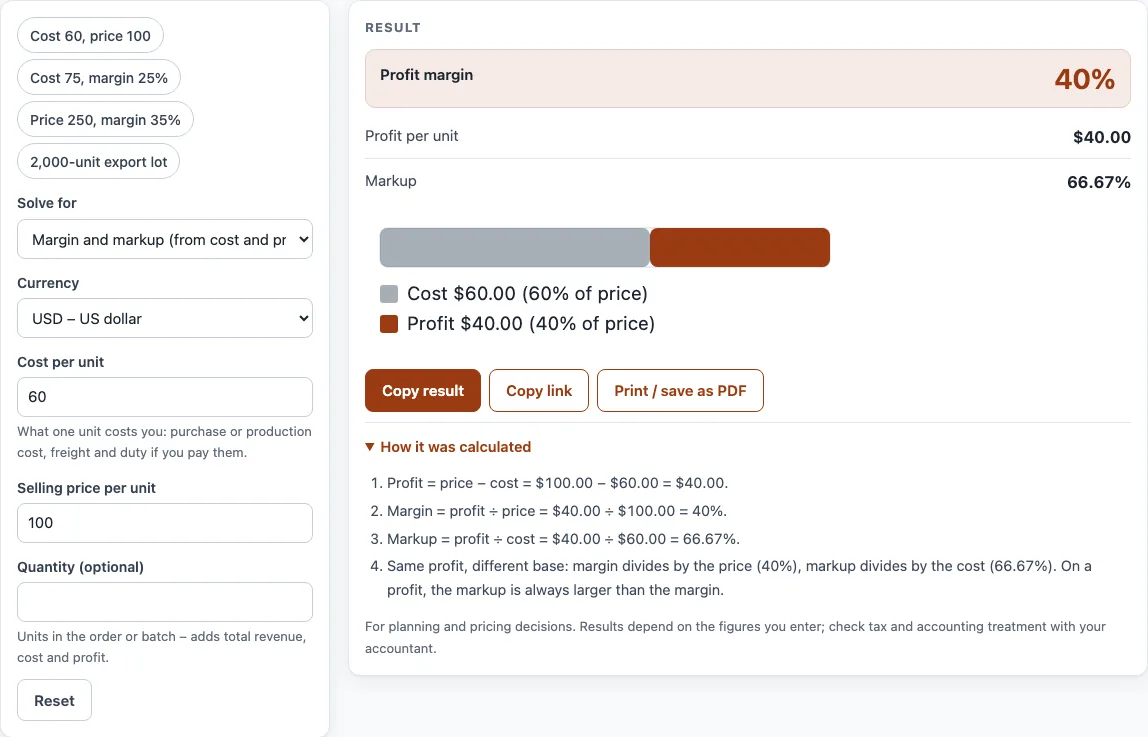
It also works in reverse, finding the selling price you need for a target margin or the highest cost you can accept. It runs in your browser, is free, and needs no sign-up. For the other calculators on the site, see all calculators. The result updates as you type, so you can test several prices before you choose one. The example buttons at the top of the form load a realistic case, such as a cost of 60 with a price of 100.
How to use the Margin Calculator
- Open the Solve for menu. To calculate margin from a cost and a price you already have, choose “Margin and markup (from cost and price)”.
- Type your Cost per unit: the purchase or production cost, plus freight and duty if you pay them.
- Type the Selling price per unit. The result updates as you type.
- Read Profit margin and Profit per unit in the result. Markup is shown too.
- Choose a Currency from the list if you want the figures labelled in it.
- Optional: enter a Quantity (optional) to see Total revenue, Total cost and Total profit for the whole order or batch.
- To work backwards, change Solve for to “Selling price (from cost and target margin)” and enter a Margin % such as 25 for 25%. The margin must be below 100.
Click an example button, such as “Cost 75, margin 25%”, to load a case instantly. “Reset” restores the starting example. “Copy link” keeps all your inputs in the page address, so opening it restores the same result. “Print / save as PDF” prints the inputs, the result, the calculation steps and the date.
To compare several cases, change one number at a time and watch the result, or click another example button. Add a Quantity to see the totals for a whole order, such as an export lot.
What is the meaning of profit margin?
Profit margin is the share of the selling price that is left as profit after the item’s cost is paid. It shows how many cents, pence or yen you keep from each sale. It is calculated as profit ÷ selling price × 100, where profit = selling price − cost. For example, a cost of 60 and a price of 100 give a profit of 40 and a margin of 40%.
What is business margin meaning?
Business margin is a general term for the margin a business earns on its sales. In everyday use it usually means gross margin on a product: revenue minus the cost of the goods sold, as a percentage of revenue. Retailers and distributors often quote margin when they talk about pricing.
Net profit margin is different. It uses net profit after all expenses, interest and tax, divided by revenue, so it is usually lower than the product margin.
What does profit margin ratio mean?
A profit margin ratio is the same figure written as a fraction or decimal instead of a percentage. A margin of 40% is the ratio 0.40. Margin can never reach 100%, because that would require a cost of zero. If the price is below cost, the margin is negative.
Markup is a related ratio, but it divides profit by cost instead of price: markup = profit ÷ cost × 100. The same sale gives a margin of 40% and a markup of 66.67%. The two are linked by margin = markup ÷ (1 + markup) and markup = margin ÷ (1 − margin).
What is profit margin meaning in business?
In business, profit margin shows how much of each sale remains after the direct cost of the item. A higher margin leaves more money to cover rent, wages and other overheads. Margin tells you whether a price is healthy, not just whether it covers cost.
To price for a target margin, divide the cost by (1 − margin), not add the margin to the cost. With a cost of 75 and a target margin of 25%, the price is 75 ÷ 0.75 = 100. Adding 25% to the cost gives 93.75, which is only a 20% margin. For export prices, include all costs up to the Incoterms delivery point, such as packing, freight and insurance, in the cost before applying the margin.
Is there one equation for profit margin?
Yes. Whether you compute profit margin for one product, are figuring margin percentage for a price list, or computing profit for a whole order, the equation for profit margin is the same: (price − cost) ÷ price × 100. When the cost is the cost of goods sold, people call it the GP (gross profit) margin formula, and some simply say earning margin. Figuring profit percentage on cost instead of price gives the markup, not the margin, so check which one your buyer or accountant means.
Sources
- Gross profit, gross margin and markup: OpenStax Principles of Accounting, Volume 1: Financial Accounting (free textbook).
- Every formula is worked through by hand in the tool’s tests (at least five reference cases per calculator).
- Currency decimals follow ISO 4217 (list one, published 17 September 2026), checked for all 24 currencies.
Worked examples
| Input | Result |
|---|---|
| Cost $60.00, price $100.00 | Price $100.00, cost $60.00, profit $40.00, margin 40%, markup 66.67% |
| Cost $75.00, target margin 25% | Price $100.00, cost $75.00, profit $25.00, margin 25%, markup 33.33% |
| Price $250.00, target margin 35% | Price $250.00, cost $162.50, profit $87.50, margin 35%, markup 53.85% |
| Cost $80.00, markup 25% | Price $100.00, cost $80.00, profit $20.00, margin 20%, markup 25% |
| Cost $12.40, price $18.60 | Price $18.60, cost $12.40, profit $6.20, margin 33.33%, markup 50% |
Calculated by the tool above with these values.
Frequently asked questions
How do I calculate margin?
Subtract the cost from the selling price to get profit. Then divide profit by the selling price and multiply by 100. The Margin Calculator does these steps for you when you enter both numbers.
What is the profit margin formula?
Profit margin = (selling price − cost) ÷ selling price × 100. Profit margin is always measured against the selling price, not the cost.
What is the gross profit margin formula?
Gross profit margin uses the same formula as profit margin for a single product. Gross profit is revenue minus the cost of goods sold, and the margin is that figure divided by revenue, multiplied by 100.
What is the difference between margin and markup?
Margin is profit as a share of the selling price. Markup is profit as a share of the cost. A 50% markup gives a margin of about 33.3%, so the two numbers are never the same unless both are zero.
How do I find the selling price for a target margin?
Divide the cost by (1 − target margin). For a cost of 75 and a target of 25%, the price is 100. Choose “Selling price (from cost and target margin)” in the Solve for menu to get this result.
Can profit margin be 100%?
No. A 100% margin would mean the profit equals the whole price, which requires a cost of zero. The calculator shows an error for margins of 100% or more.
Is net profit margin the same as profit margin?
No. Net profit margin is net profit after all expenses, interest and tax, divided by revenue. Profit margin on this page is based only on the selling price and cost of each unit.
Are my numbers uploaded anywhere?
No. Everything runs in your browser, and nothing you type is uploaded.
Related tools
- Markup calculator — the price from cost and markup, or the markup between cost and price.
- Markup v margin chart — convert markup and margin and print a conversion table.
- Gross margin calculator — gross profit and gross margin from revenue and COGS.
- Net margin calculator — net profit and net profit margin after all costs.
- Break even calculator — break-even units and sales with a chart.
- Discount calculator — percent off, sale price and stacked trade discounts.
- VAT calculator — add or remove VAT, one line or several rates.
- Sales tax calculator — US sales tax with state, county and city rates, or taken out of a total.
- WACC calculator — weighted average cost of capital, with CAPM for the cost of equity.
- EBITDA calculator — EBITDA from net income or EBIT, with margin and EV/EBITDA.
- Price elasticity of demand calculator — elasticity between two prices and what it means for revenue.